

Build an AI News Auto-Publisher that writes Arabic SEO articles from RSS feeds
0 Prerequisites
Before you start, make sure you have:
1 Import the Workflow
The fastest way to get started is to download and import the pre-built workflow:
- Download the workflow JSON from Google Drive ↗ or use the green button at the top of this page
- Open your n8n instance and go to Workflows → Import from File
- Select the downloaded JSON file and click Import
- The full workflow will appear — ready to configure
2 Set Up RSS Feed Sources
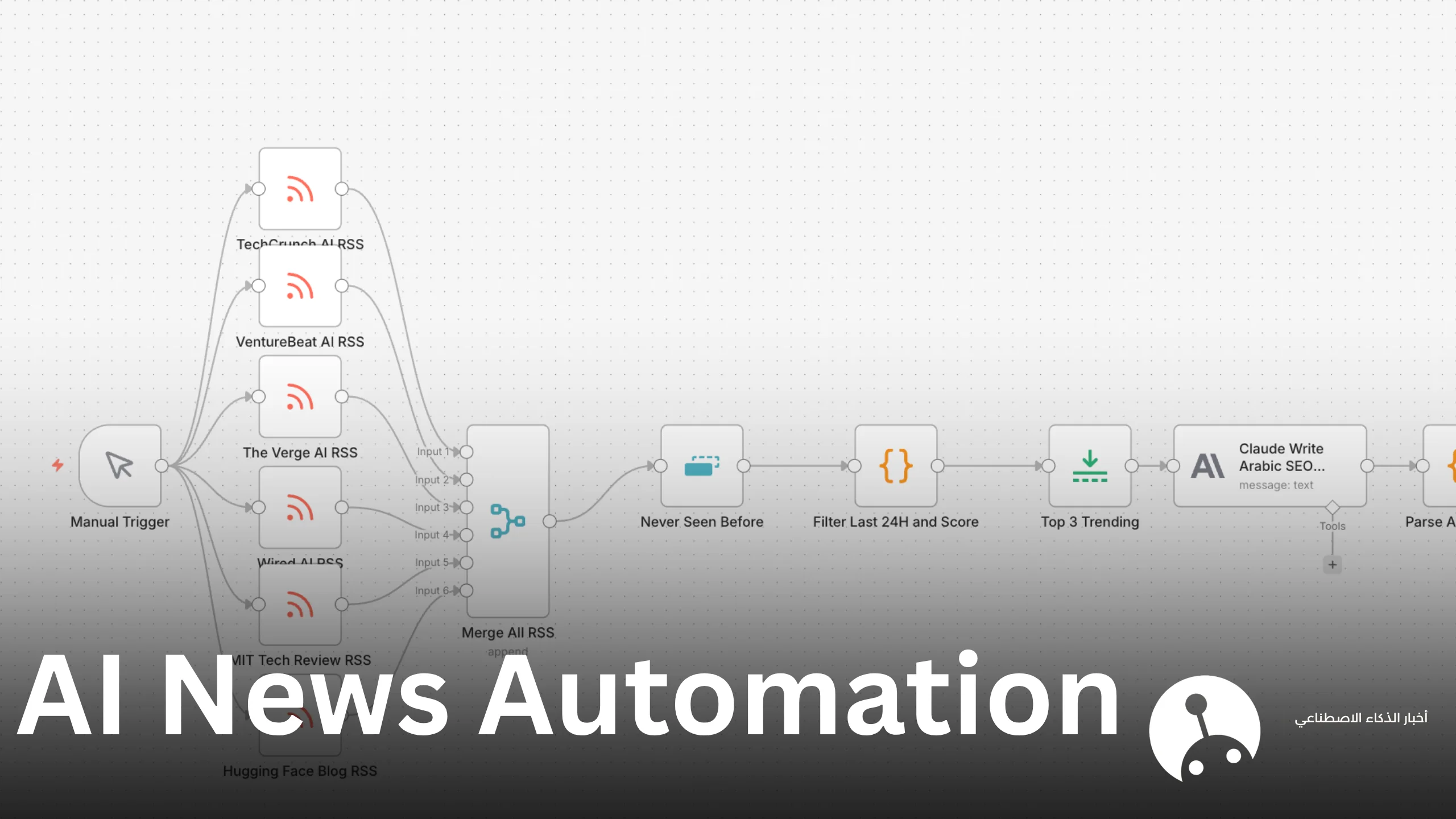
The workflow pulls from 6 high-quality AI & tech news sources. Each is an RSS Feed Read node.
| Source | RSS URL | Typical Items |
|---|---|---|
| TechCrunch AI | https://techcrunch.com/feed/ | ~1/day |
| VentureBeat AI | https://venturebeat.com/feed/ | ~20/day |
| The Verge AI | https://www.theverge.com/rss/index.xml | ~7/day |
| Wired AI | https://www.wired.com/feed/rss | ~10/day |
| MIT Tech Review | https://www.technologyreview.com/feed/ | ~10/day |
| Hugging Face Blog | https://huggingface.co/blog/feed.xml | ~757 total |
All 6 RSS nodes connect to a single Merge (Append) node which combines everything into one stream of ~814 items.
3 Filter & Score Articles
3a — Deduplicate (“Never Seen Before”)
This Code node removes duplicate articles by checking the link field:
const seen = new Set();
return $input.all().filter(item => {
  const link = item.json.link;
  if (!link || seen.has(link)) return false;
  seen.add(link);
  return true;
});
3b — Filter Last 24H and Score
Only articles published within the last 24 hours are kept. Each article is then scored by counting how many AI-related keywords appear in the title and summary:
const AI_KEYWORDS = [
  'ai', 'artificial intelligence', 'machine learning',
  'llm', 'gpt', 'claude', 'gemini', 'openai', 'deepmind',
  'neural', 'model', 'chatbot', 'automation'
];

const now = Date.now();
const MS_24H = 24 * 60 * 60 * 1000;

return $input.all()
  .filter(item => {
    const pub = new Date(item.json.pubDate).getTime();
    return (now - pub) < MS_24H;
  })
  .map(item => {
    const text = (item.json.title + ' ' + item.json.contentSnippet).toLowerCase();
    const score = AI_KEYWORDS.reduce((acc, kw) =>
      acc + (text.includes(kw) ? 1 : 0), 0
    );
    return { ...item, json: { ...item.json, aiScore: score } };
  })
  .filter(item => item.json.aiScore > 0)
  .sort((a, b) => b.json.aiScore - a.json.aiScore);
3c — Top 3 Trending
A simple slice to take the 3 highest-scoring articles:
return $input.all().slice(0, 3);4 Write Arabic SEO Articles with Claude
The Anthropic node sends each of the top 3 articles to Claude with a detailed system prompt. Configure it as follows:
Node Type
Use the Anthropic Chat Model node (LangChain integration) with model claude-opus-4-5.
The Prompt
You are an expert Arabic SEO content writer.
Given this AI news article:

Title: {{ $json.title }}
Source: {{ $json.link }}
Summary: {{ $json.contentSnippet }}

Write a comprehensive, SEO-optimized Arabic blog article.
Include:
1. An engaging Arabic title with the primary keyword
2. A meta description (160 chars max)
3. Full article body (600-900 words) in Modern Standard Arabic
4. 5 relevant Arabic SEO tags
5. A concluding call-to-action

Respond ONLY in JSON format:
{
  "title": "...",
  "meta_description": "...",
  "content": "...",
  "tags": ["..."],
  "slug": "..."
}5 Parse the Article Data
Claude returns JSON wrapped in a text block. This Code node cleanly parses it:
const raw = $input.first().json.text || '';
try {
  const clean = raw.replace(/```json|```/g, '').trim();
  const parsed = JSON.parse(clean);
  return [{ json: parsed }];
} catch(e) {
  // Fallback if Claude's response isn't perfect JSON
  return [{ json: {
    title: 'Draft Article',
    content: raw,
    tags: [],
    slug: 'draft-' + Date.now()
  }}];
}
6 Save as WordPress Draft
The final node posts to your WordPress site via the REST API using Basic Auth with an Application Password.
HTTP Request Node Configuration
| Field | Value |
|---|---|
| Method | POST |
| URL | https://yoursite.com/wp-json/wp/v2/posts |
| Authentication | Basic Auth (username + app password) |
| Body | JSON (see below) |
Request Body
{
  "title": "{{ $json.title }}",
  "content": "{{ $json.content }}",
  "status": "draft",
  "tags": {{ JSON.stringify($json.tags) }},
  "slug": "{{ $json.slug }}",
  "excerpt": "{{ $json.meta_description }}"
}
Getting a WordPress Application Password
- Go to WordPress Admin → Users → Your Profile
- Scroll to Application Passwords
- Enter a name (e.g. “n8n”) and click Add New Application Password
- Copy the generated password — you won’t see it again
7 Test & Schedule
Test Run
Click the Manual Trigger node, then click Execute Workflow. Watch data flow through each node. After ~30 seconds you should see 3 new draft posts in your WordPress dashboard, each with a full Arabic article.
Automate with a Schedule
Replace the Manual Trigger with a Schedule Trigger node to run automatically. Recommended settings:
// Run every day at 7:00 AM
Cron: 0 7 * * *8 What You Get
| Output | Details |
|---|---|
| 📝 Arabic title | SEO-optimized with primary keyword |
| 📋 Meta description | Under 160 characters for Google snippets |
| 📄 Full article | 600–900 words in Modern Standard Arabic |
| 🏷 Tags | 5 Arabic SEO tags per article |
| 🔗 URL slug | Arabic transliterated slug |
| 💾 Status | Saved as Draft — you review before publishing |
💡 Customization Ideas
Add more sources
Add more RSS Feed Read nodes for sources like ArXiv AI papers, Google AI Blog, or any niche publications relevant to your audience.
Change the target language
Modify the Claude prompt to write in French, Spanish, or any language. Just replace “Modern Standard Arabic” with your target language.
Auto-publish instead of draft
Change "status": "draft" to "status": "publish" in the WordPress body — though reviewing first is always recommended.
Add featured images
Extend the workflow with an image generation node (DALL-E, Stability AI) to auto-create featured images for each article.
Add to Google Sheets log
Append each published article’s title, URL, and date to a Google Sheet for easy tracking.