What You Need
- TouchDesigner (free version works)
- Claude Code (Anthropic’s AI coding CLI)
- Node.js 18+
- A webcam
- Mac or Windows
Step 1 — Install Claude Code & the TouchDesigner MCP Server
Claude Code lets AI talk directly to your TouchDesigner project through MCP (Model Context Protocol).
Install the MCP server in one command:
claude mcp add-json touchdesigner –scope user ‘{“command”:”npx”,”args”:[“-y”,”touchdesigner-mcp-server@latest”,”–stdio”]}’
Verify it worked:
claude mcp list
You should see touchdesigner · ✔ connected · 13 tools.
Step 2 — Set Up TouchDesigner
- Download
touchdesigner-mcp-td.zipfrom the releases page - Extract it — don’t move any files inside the folder
- Open TouchDesigner and drag
mcp_webserver_base.toxinto your project - Place it at
/project1/mcp_webserver_base
The MCP server runs on port 9981 by default.
Step 3 — Install MediaPipe (AI Hand Tracking)
In Claude Code, type:
Install mediapipe in TouchDesigner’s Python environment using a Script DAT, then delete it when done.
Step 4 — Build the Hand Tracking Network
In Claude Code, type:
Create a TouchDesigner network in the current project for real-time hand tracking using the webcam. Use a Video Device In TOP for the webcam, connect it to a Script CHOP using MediaPipe to detect both hands and output 3D positions of thumb tip, index tip, middle tip, ring tip, and pinky tip for each hand. Name channels: left_thumb_tip_x/y/z, right_index_tip_x/y/z etc. Apply lag smoothing. Target 60fps. Put everything inside a Base COMP called hand_tracking.
This creates a complete network with:
- 30 output channels (5 fingers × 2 hands × 3 axes)
- Lag CHOP smoothing for stable tracking
- 60fps webcam input
Step 5 — Build Your Visual
Now the fun part. With hand tracking running, you can build anything on top. Here are three prompts I used:
Hand Skeleton Overlay (like the image above):
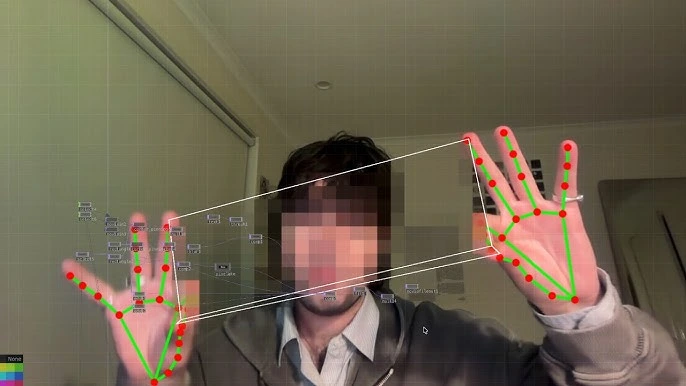
Create a Base COMP called hand_skeleton. Show the live webcam feed, draw red dots on each fingertip and green lines connecting the joints for both hands. Draw a white rectangle connecting both index fingertips. Composite over webcam. Output to skeleton_out at 1280×720.
How It Works
Webcam → MediaPipe Script CHOP → Lag Smoothing → hand_out (30 channels)
↓
Your Visual Network
Claude Code sends Python commands to TouchDesigner through the MCP server. It creates nodes, writes scripts, connects wires, and fixes errors — all from a chat interface.